Building forms with Zod, React Hook Form and TanStack Query
How you can connect form state, shared validation and a server boundary, then update the displayed data after a successful save.

Introduction
This article explains how Zod, React Hook Form and TanStack Query work together in a Next.js form flow. A task-creation example illustrates shared validation schemas, inferred types, form state and feedback, and repeated validation at the server boundary. It also shows how submission, persistence and query invalidation connect to keep displayed data consistent with saved records.
This example creates a task with a title and priority. Try an empty title, add a task, then enable Fail next save and submit another. The failed attempt should keep your draft. Reload the page after a successful save to see the persisted list.
Interactive example
Create and save tasks
Add a fictional task or try a failed save. Submissions are validated on the server, then saved in this browser.
Use example data only. Saved tasks stay here until you reset the demo or clear site storage.
Open the demo on its own page.
The demo makes a real request to a Server Action. The integration is simulated, and saved tasks live in localStorage in your browser. Use fictional values.
1. Define and reuse Zod schemas
1.1 Define and compose schemas
The title must contain something after trimming whitespace, and the priority must be one of three values. You put those rules in a shared schema. The saved task adds an ID, so you extend that schema instead of repeating its fields. The list is then an array of the same saved-task schema.
import { z } from 'zod'

export const taskInputSchema = z.object({
  title: z
    .string()
    .trim()
    .min(1, 'Enter a title.')
    .max(100, 'Use 100 characters or fewer.'),
  priority: z.enum(['low', 'normal', 'high'])
})

export const taskSchema = taskInputSchema.extend({ id: z.uuid() })
export const taskListSchema = z.array(taskSchema)

// Simulation controls belong to the request, never to the saved task.
export const createTaskRequestSchema = z.object({
  input: taskInputSchema,
  failNextSave: z.boolean()
})
The form and Server Action reuse taskInputSchema. The failure switch belongs to the request envelope, so it never becomes part of a saved task. Reuse here means sharing rules that describe the same input. It does not mean exposing a complete database record to every client or forcing every operation to accept identical fields.
1.2 Type inference and runtime validation
Zod also gives TypeScript a description of the validated data. When a function boundary needs a named type, z.infer<typeof taskSchema> derives it from the schema. Within the form and query hooks, you let the functions infer their types where they already have enough information. This avoids maintaining an interface beside a schema that says the same thing.
Types and validation solve different problems. TypeScript helps while writing code, but it cannot establish that an incoming request or stored JSON is valid. A type assertion such as as Task does not inspect or repair that value. Parsing with Zod checks it at runtime and produces the typed result used by the next step.
import { z } from 'zod'

import { taskInputSchema } from './schemas'

type TaskInput = z.infer<typeof taskInputSchema>
const data: unknown = JSON.parse('{"title":42,"priority":"urgent"}')

// Bad: the assertion accepts invalid data without checking it.
const asserted = data as TaskInput
asserted.title // TypeScript says string, but the runtime value is 42.

// Good: validate before treating the value as task input.
const validated = taskInputSchema.parse(data)
// This throws a ZodError for both fields. Valid input returns an inferred type.
The assertion changes what TypeScript believes about data. It does not convert the number to a string or check the priority. Parsing rejects this input before it reaches the next step. Use safeParse when you want to handle a validation failure as a result instead of catching an error.
2. Connect Zod to React Hook Form
2.1 Configure the Zod resolver
React Hook Form holds the unsaved values and field errors. The resolver connects it to the input schema, including type inference. The essential setup is small:
import { zodResolver } from '@hookform/resolvers/zod'
import { useForm } from 'react-hook-form'

import { defaultValues, taskInputSchema } from './schemas'

const form = useForm({ resolver: zodResolver(taskInputSchema), defaultValues })
This is why you pass the Zod schema to React Hook Form through zodResolver. The same schema supplies runtime validation and type inference: the form knows that title is a string and priority accepts only 'low', 'normal' or 'high'.
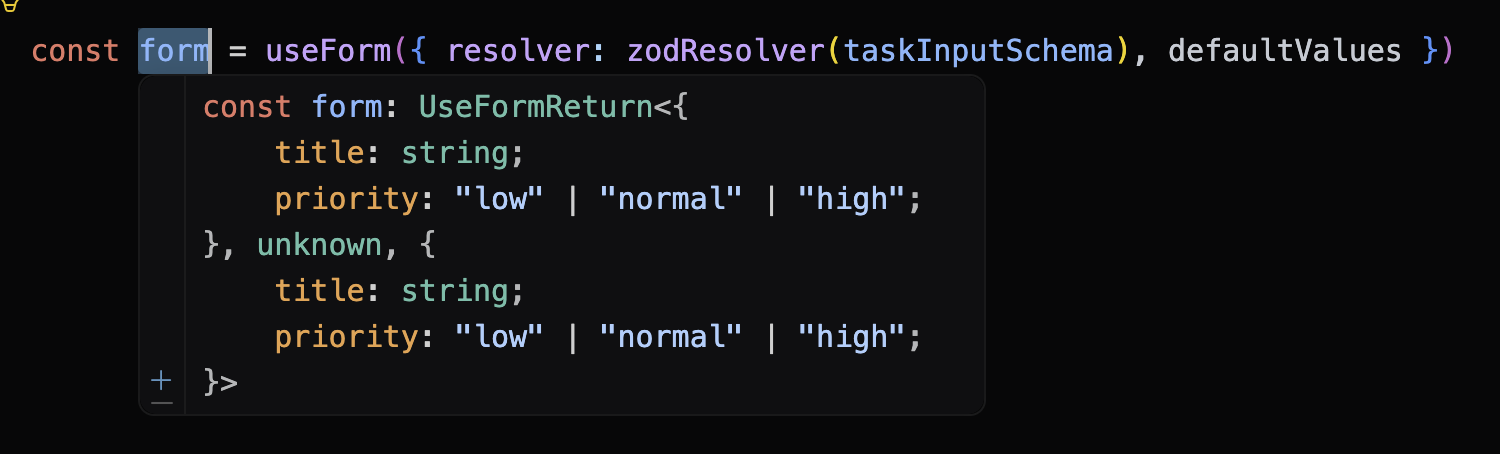
Screenshot: The form's input and output types are inferred from the schema.
That gives you autocomplete and compile-time checks for field names and values, while the resolver checks the actual input at runtime. You do not need to maintain a separate form type alongside the validation rules.
2.2 Handle submission and feedback
Validation runs on submission, with corrections revalidated as the user changes them. Save remains available for invalid input so an attempted submission can reveal the relevant errors. During a request, the fields and competing controls are disabled. The button says “Saving…” and a status message explains what is happening.
const submit = form.handleSubmit(async (input) => {
  // Submit the validated, inferred input. The save flow is covered below.
})

<form noValidate onSubmit={submit}>
  {/* Registered fields go here. */}
  <button type='submit' disabled={form.formState.isSubmitting}>
    {form.formState.isSubmitting ? 'Saving…' : 'Save task'}
  </button>
</form>
handleSubmit runs the resolver and calls the callback only when validation succeeds. noValidate leaves validation feedback to React Hook Form, and isSubmitting stays true while the async callback is running. The snippet omits the fields and save logic to show the HTML wiring.
3. Validate requests on the server
Client validation gives useful feedback, but a caller can bypass the interface. The Server Action therefore accepts an untrusted value and parses the request independently. This is the validation part of the action:
'use server'

import { z } from 'zod'

import { createTaskRequestSchema } from './schemas'

export async function createTaskAction(request: unknown) {
  // A typed caller and client validation cannot establish trust across a request.
  const parsed = createTaskRequestSchema.safeParse(request)
  if (!parsed.success) {
    return {
      task: null,
      fieldErrors: z.treeifyError(parsed.error).properties?.input?.properties,
      message: 'Check the form values and try again.'
    }
  }
  // The simulated integration follows validation in the complete action.
}
The complete action waits briefly, returns an expected failure when requested, or creates a task ID and returns the validated task. Its return type is inferred. The form maps returned title and priority errors back to their fields, and uses a form-level message for other failures. The simulated failure is labelled both in the interface and in source comments.
In a real application, this server boundary must authenticate the caller and check their permission before performing a protected operation. Database access and integrations requiring credentials stay on the server. Only the fields that the caller is allowed to receive should be returned. For client-driven reads, a server-controlled endpoint can perform those checks and return a narrow response.
4. Save data and refresh the query cache
The database remains the source of truth, while TanStack Query caches server responses in the client for immediate reuse. Configuring how long that data stays fresh avoids unnecessary requests and can reduce database load. The hooks infer their types from the query and mutation functions, so they do not need duplicate task types.
4.1 Submit through a mutation
import { useMutation, useQueryClient } from '@tanstack/react-query'
import { z } from 'zod'

import { createTaskAction } from './actions'
import { createTaskRequestSchema } from './schemas'
import { saveTask } from './storage'

const queryClient = useQueryClient()

return useMutation({
  mutationFn: async (request: z.input<typeof createTaskRequestSchema>) => {
    const result = await createTaskAction(request)
    // Demo-only storage substitute. In production, the action writes to the database.
    if (result.task) saveTask(result.task)
    return result
  },
  onSuccess: async (result) => {
    // Expected server failures also resolve, so check before refreshing.
    if (result.task) {
      await queryClient.invalidateQueries({
        queryKey: tasksQueryOptions.queryKey
      })
    }
  },
  retry: false
})
The mutation calls the Server Action, which in production returns the saved task after a successful database write. Expected failures also resolve, so onSuccess checks the result before refreshing. A failed save leaves the draft and existing list intact.
4.2 Refresh the cached list
Invalidating the task query marks its cached data as stale and refetches the active list through a server-controlled endpoint. Awaiting invalidation keeps the mutation pending through that refresh. Unrelated queries keep their cached data. TanStack explains invalidation after mutations.
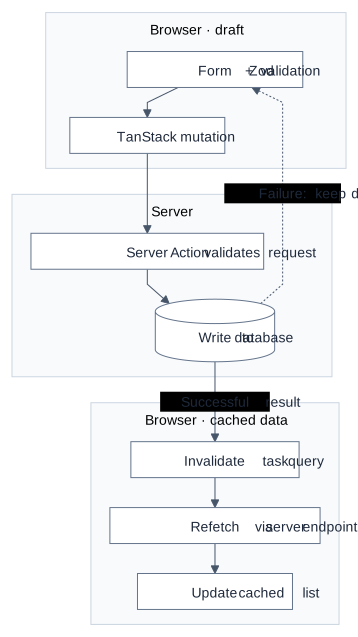
Diagram: The production flow writes to the database on the server, then refreshes the client's cached list.
Conclusion
Zod provides validation and inferred types, React Hook Form manages the draft, and the Server Action checks requests before authorised writes. TanStack Query coordinates saves and cache refreshes, giving you clear submission feedback and consistent displayed data with fewer unnecessary reads.