Academic Workload Manager
An academic workload planner developed for Griffith University, helping planners decide who teaches each class throughout the academic year, across campuses.

Overview
Griffith University’s ICT department faced a complex, time-consuming task allocating academics to courses across multiple trimesters and campuses. Each assignment had to balance workloads, subject knowledge and travel between campuses, making it difficult to find suitable allocations.
To solve this problem, our team of five students developed a complete, deployable application for the ICT department. I led frontend development and built the backend services for workload calculation, suitability ranking and automatic allocation.
- Role: Lead frontend engineer, with substantial backend contributions.
- Result: A working application that helped planners allocate academics to courses across trimesters and campuses. Awarded a High Distinction (7/7).
Technical contributions
1. An interactive workload planner
I designed and built the planner around the allocation workflow, connecting courses, campuses and trimesters in one view. Users can compare suitable educators, assign them manually and inspect workload and suitability warnings before continuing with their plan.
Campus filtering and trimester navigation help users focus on the relevant offerings. Candidate details explain the factors behind a recommendation, giving planners information to assess an assignment alongside their own judgement.
Comparing candidates, making a manual allocation, reviewing workload feedback, filtering campuses and running automatic allocation. Demonstrated with mocked data.
2. Suitability ranking and automatic allocation
2.1 Suitability ranking
I implemented a weighted ranking algorithm to help planners compare educators for each teaching offering. Example factors include:
| Factor | Maximum contribution |
|---|---|
| Previous allocations to the course | +40 |
| Matching subject knowledge | +30 |
| Primary course convenor | +20 |
Several other factors, including campus suitability, availability and workload capacity, also affect the ranking.
2.2 Automatic allocation
I built automatic allocation on the same ranking algorithm. It works through unallocated teaching offerings, reassessing educator suitability as workloads change. Existing allocations are retained, and offerings remain unfilled when no suitable educator is available.
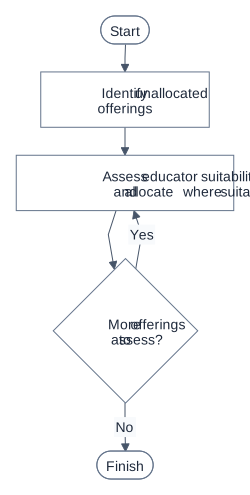
Each offering is assessed in turn, using the same suitability ranking.
3. Planner performance
I addressed the rendering and data-loading costs of viewing courses across multiple campus and trimester columns. Later local tests with 2,000 synthetic courses, three trimesters and two campuses measured the two improvements below.
3.1 Rendering fewer planner elements
-
Problem: Rendering every course across campus and trimester columns creates a large number of planner elements, including rows outside the visible area.
-
Solution: I used virtualisation to render only nearby course rows, loaded heavier popups on demand and reduced repeated lookups during rendering.
-
Measurement: I counted HTML and SVG elements inside the planner at initial readiness, comparing the same fully loaded dataset with virtualisation disabled and enabled. Pagination was disabled in both configurations, while deferred popup content and map lookups remained enabled in both.
Measurement Before: without virtualisation After: with virtualisation Rendered planner elements 74,330 1,423 Virtualisation resulted in 98% fewer rendered planner elements.
3.2 Reducing initial planner loading time
-
Problem: Fetching every course upfront increases the wait before the initial planner view is ready.
-
Solution: I used pagination to limit initial data fetching. Cached queries and targeted invalidation also refresh planner data after changes without discarding unrelated cached information.
-
Measurement: I compared initial planner loading time with all courses fetched at once versus pagination, keeping virtualisation enabled in both. This measured when the initial view was ready, rather than when the full dataset had downloaded.
Measurement Before: fetching all courses After: pagination Initial planner readiness 3.4 seconds 0.7 seconds Pagination reduced initial planner readiness time by 78%.
These are medians from five runs per configuration using a production frontend and local SQLite test database. Measurement conditions and ranges.
I also contributed academic and course management, comments, import validation, reporting integration and authentication workflows.
Outcome
We handed over a complete, deployable codebase and received positive client feedback. Griffith took ownership and responsibility for hosting and management. Our involvement ended at handover.

